vim.treesitter
もしもnvim-treesitterが使用できなくなった場合…、
つまりこの先の説明で言うところのpluginsが失われてしまった世界のおはなしです😢
Treesitter integration                                 *treesitter*

Nvim integrates the `tree-sitter` library for incremental parsing of buffers:

Nvim は、バッファの増分解析のために`tree-sitter`ライブラリを統合しています:

https://tree-sitter.github.io/tree-sitter/

WARNING: Treesitter support is still experimental and subject to frequent
changes. This documentation may also not fully reflect the latest changes.

警告:Treesitter のサポートは依然として実験段階にあり、頻繁に変更される可能性があります。
また、このドキュメントには最新の変更が完全に反映されていない場合があります。
前のページで “destruction” などとイジってしまったわたしがこれをやるのも、なかなかに狂っているのだけれど…😓
Parsers
PARSER FILES                                              treesitter-parsers*

Parsers are searched for as `parser/{lang}.*` in any 'runtimepath' directory.
If multiple parsers for the same language are found, the first one is used.

パーサーは、任意の 'runtimepath' ディレクトリ内で `parser/{lang}.*` の形式で検索されます。
同じ言語のパーサーが複数見つかった場合、最初のものが使用されます。

(NOTE: This typically implies the priority "user config > plugins > bundled".)

(注:これは通常、「ユーザー設定 > プラグイン > バンドル」という優先順位を意味します。)
この説明にあるように、parser/{lang}.*形式でファイルを配置していくために、
まずは.config/nvim配下にparsersディレクトリを作成しておきましょう。
Queries
TREESITTER QUERIES                                          treesitter-query*

Treesitter queries are a way to extract information about a parsed |TSTree|,
e.g., for the purpose of highlighting. Briefly, a `query` consists of one or
more patterns. A `pattern` is defined over node types in the syntax tree. A
`match` corresponds to specific elements of the syntax tree which match a
pattern. Patterns may optionally define captures and predicates. A `capture`
allows you to associate names with a specific node in a pattern. A `predicate`
adds arbitrary metadata and conditional data to a match.

Treesitter のクエリは、解析済みの |TSTree| に関する情報を抽出するための手段であり、
例えばハイライト表示などの目的で使用されます。簡単に言えば、`query` は1つ以上の
パターンで構成されます。`pattern` は、構文木のノード型に対して定義されます。
`match` は、パターンに一致する構文木の特定の要素に対応します。
パターンには、オプションでキャプチャや述語を定義できます。
`capture` を使用すると、パターン内の特定のノードに名前を関連付けることができます。
`predicate` は、マッチに任意のメタデータや条件付きデータを追加します。

Queries are written in a lisp-like language documented in
https://tree-sitter.github.io/tree-sitter/using-parsers/queries/1-syntax.html
Note: The predicates listed there differ from those Nvim supports. See
|treesitter-predicates| for a complete list of predicates supported by Nvim.

クエリは、Lisp に似た言語で記述され、その詳細は
https://tree-sitter.github.io/tree-sitter/using-parsers/queries/1-syntax.html
注:そこに記載されている述語は、Nvim がサポートするものと異なります。Nvimがサポートする述語の完全なリストについては、
|treesitter-predicates| を参照してください。

Nvim looks for queries as `*.scm` files in a `queries` directory under
`runtimepath`, where each file contains queries for a specific language and
purpose, e.g., `queries/lua/highlights.scm` for highlighting Lua files.
By default, the first query on `runtimepath` is used (which usually implies
that user config takes precedence over plugins, which take precedence over
queries bundled with Nvim). If a query should extend other queries instead
of replacing them, use |treesitter-query-modeline-extends|.

Nvim は、`runtimepath` 配下の `queries` ディレクトリ内に `*.scm` ファイルとしてクエリを検索します。
各ファイルには特定の言語や目的に対応したクエリが含まれており、
例えば、Luaファイルのハイライト用には `queries/lua/highlights.scm` が使用されます。
デフォルトでは、`runtimepath` にある最初のクエリが使用されます
(これは通常、ユーザー設定がプラグインより優先され、プラグインが Nvim に同梱されているクエリより優先されることを意味します)。
クエリを置き換えるのではなく、他のクエリを拡張したい場合は、|treesitter-query-modeline-extends| を使用してください。

The Lua interface is described at |lua-treesitter-query|.

Lua インターフェースについては、|lua-treesitter-query| で説明されています。
なんだか色々書いてありますが、とりあえず
Nvim looks for queries as `*.scm` files in a `queries` directory under `runtimepath`
…ってことなので、これもまた.config/nvim配下にqueriesディレクトリを作成しておきましょう。
treesitter-cli
もう一個だけ…。
このあと行うビルド作業にはtreesitter-cliが必要になるのでインストールしましょう。
MacOSであれば毎度お馴染みHomebrewを使えば簡単ですね。
tree-sitter-rust
ここでは、Rustを例に進めます。
なんかもうnvim-treesitterに依存しちゃってることを隠す気もありませんが、
SUPPORTED_LANGUAGES
からRustを探してみると、tree-sitter-rustの URL が示されていますね。
これをgitで取得しましょう。(一時的な作業をするだけなので適当な場所で良いです。)
git clone --depth 1 https://github.com/tree-sitter/tree-sitter-rust
そしたら中に入って…
cd tree-sitter-rust
ここからやることは 2つです😉
build
前項でインストールしたtree-sitter-cliを使ってビルドします。
うまくいけばrust.dylibが出来上がるはずです。
そしたら、これを.config/nvim/parserにコピーしましょう❗
Parsers are searched for as `parser/{lang}.*` in any 'runtimepath' directory.
ヘルプにある条件を満たせましたね🐶
scm
tree-sitter-rustにはqueriesディレクトリが存在しているので、
この中にあるhighlights.scm,injections.scm,tags.scmを.config/nvim/queriesにrustディレクトリを作ってコピーしましょう。
Nvim looks for queries as `*.scm` files in a `queries` directory under `runtimepath`
こっちもヘルプの通りになりましたね🐱
Confirm
ここまでで、ファイルツリーの全体像はこんな感じになるはずです。
 nvim
 ├── init.lua
 ├── lua
 │   ├── ...
 │   ...
+├── parser
+│   └── rust.dylib
+├── queries
+│   ├── rust
+│   │   ├── highlights.scm
+│   │   ├── injections.scm
+│   │   └── tags.scm
 ... ...
CheckHealth
それではnvimを起動してcheckhealthを動かしてみましょう。
そしたら、多分こんな感じの診断が出てくるでしょう❓
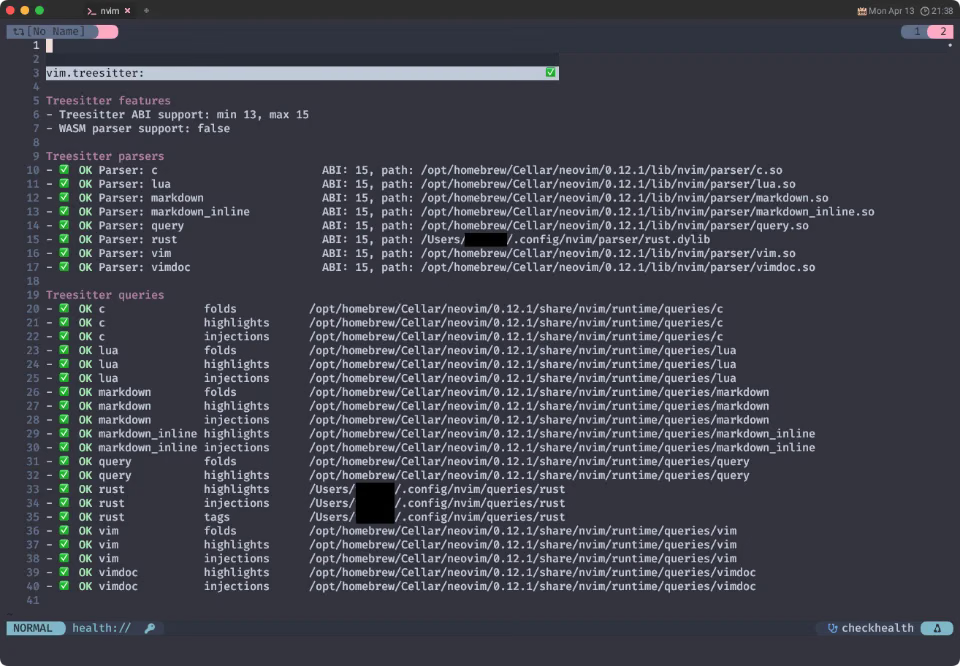
nvimが同梱しているparsers,queriesと混じって、今回手動で追加したrustが確認できていれば成功です❗
Wrap Up
今回例として挙げたrustでは、とっても素直に出来るんですが、
buildをするにはgrammar.jsなのか、parser.cなのか、はたまたgrammar.jsonなのかを必要とするらしいんですね。
(エラーメッセージでは “grammar.jsonが無い❗” って言われますが、詳しいことは知らない😅)

例えばTypescript(tree-sitter-typescript)なんかだと、
トップにgrammar.jsは存在しなくて、typescriptとtsxっていうディレクトリの中にそれぞれのgrammar.jsが存在しているので、
そこに移動してbuildするとうまくいきます。
仕様と言うのか、もしくは規格と言うのか、はたまたお作法なのか、 雰囲気は実におおらかなものらしいので、なんかたまに小さな差異があって面倒くさいです🥺
𝒬𝓊𝑒𝑒𝓃𝒾𝑒 𝓔𝔂𝑒 🖊️
僕に教えてくれないルールがあった
何ひとつ計画も示さなかった
君が売りつけてきた物語も全て
何ひとつ 僕を理解へは導かなかった
それでも解決しなければならなかった
誰も助けてはくれなかった
それで結局分かったんだ
自分でやるしかないってことが
人生は 貧乏から金持ちへのゲーム
名声に群がる 野良犬やビッチども
選べる品なんて腐るほどある, もう分かってるだろ
密告で食ってる連中さ
邪悪な魔女たちが 炎を煽る
触れるものには注意しろ 丸焦げになるかもな
Queenie eye, queenie eye, ボールを持ってるのはだあれ?
ぼくじゃないよ, ポケットにも入ってない
O・U・T と綴ったなら
ほらアウト
疑う余地もないよ
だって 君はあっちこっち言いふらしてきたんだから
聞こえるだろ 民衆の叫び
聞けよ 人々の叫び
ゲームに挑み, チャンスを掴め
どんなダンスも 大体同じ
どの催しを選ぼうが構わない
状況のせいにしてはいけない
ロマンスなんて滅多に訪れない
負けることがわかっている喧嘩は 絶対にするな
完結までは まだ遠い道のり
行ったことがないなら尚更だ
緊張はしたけど, やり遂げた
ここからまた獲りにいくぞ
さあ 声を上げろ
聞こえるだろ 民衆の叫び
聞こえるだろ 民衆の叫び
聞けよ 人々の叫び
聞こえてるだろ…